Guideline
A simple guide and rules for using coding agents well
Use AI agents only when they really help you think. Do everything else by hand, keep it small, and keep it cheap.
TL;DR — the whole guide in six lines
- Easy, short task → do it yourself. No agent.
- Small, clear task → MAI Code 1 Flash or Haiku 4.5.
- Everyday coding, unclear tasks, many files → Sonnet 5. Long code-heavy agent runs → GPT 5.3-Codex.
- Planning and the hardest tasks only → Opus 4.8 (Fable 5 for some teams).
- Every message sends the whole chat again → start a new chat for each task, and attach only 3–5 files you need.
- Never give an AI private data, passwords, keys, or real customer data.
The main lesson: choosing the right files matters more than writing longer prompts.
Copilot now charges by tokens, so bigger context costs more every time. Use a cheap model for simple work, and a mid model (GPT 5.3-Codex for code, or Sonnet 5 for thinking) for most work. Use Opus 4.8 only when the task is hard enough to be worth the extra cost.
The AI gets you most of the way fast, but finishing the job well still needs your judgment.
Data safety (very important): never give an AI private or sensitive data. This means personal data (names with records, emails, phone numbers, addresses, ID or passport numbers), passwords and secrets (API keys, tokens, passwords, private keys, .env files), and real customer data. If a task needs sensitive data, use fake or hidden sample data instead. If you are not sure, leave it out and ask a teammate first.
Must-watch course: Watch this course. It is about 1 hr 51 min. You can speed up the parts you already know.
Operating principles
These are the main rules we follow when we work with AI agents.
Manual first
If a task is easy and short, just do it yourself. Do not start an agent for work that is faster to do than to explain.
The right files matter more than a clever prompt
A simple prompt with the right 3 to 5 files works better than a long, clever prompt with too many files. Spend your tokens on useful files, not extra words.
Start a new chat for each task
Start a new chat for each new task. Long chats get less accurate, forget your rules, and cost more with every message. But do not open a new chat for every small follow-up question: keep related questions in one chat, and start fresh when the topic changes.
Always check before passing work to another model
Never let one model's answer go straight into another model without you checking it first. Skipping this check wastes money and lowers quality.
Manual vs agent decision gate
Use the smallest, cheapest option that can do the job right. Move up only when the task is unclear, risky, or large.
| Task profile | Default route | Model guidance |
|---|---|---|
| Small text edits, easy UI changes, one-line changes, simple renames | Manual only | No agent |
| A clear, small task with little doubt | Executor only | Use MAI Code 1 Flash or Haiku 4.5 for very simple tasks, GPT 5.3-Codex for heavy coding, or Sonnet 5 for normal work that needs thinking |
| Task with many files, unclear order, or that needs written hand-off notes | Planner then executor | Use Opus 4.8 to write plan.md, then let a cheaper model do the work |
| Security work, big design work, or work that often breaks other things | Planner, executor, reviewer | Use an expensive model to review only when a bug would cost more than the review |
Tokenomics for developers
Tokenomics just means how token cost works. Copilot charges you by tokens, not by the number of messages. Two things set your cost: how much text you send in, and how much text the model writes back. Everything else comes from these two.
The one thing to remember: every message sends the whole chat again. When you send your 10th message, you do not pay for one message. You pay for the whole chat so far, again, as input. This is why long chats get expensive, and why starting a new chat for each task saves money, not just keeps things tidy.
Input and output both cost, output usually more
You pay for the text you send in and the text the model writes back. The model's answer costs more per token, so long answers and long thinking cost the most.
Context adds up
Five attached files are sent again with every message until the chat ends. Big context is a cost you pay every message, not just once. This is why you should attach only the 3 to 5 files you really need.
The model you pick changes the cost a lot
The same task on a top model can cost several times more than on a cheap model. Picking the right model changes your bill far more than the words in your prompt.
More thinking effort costs more
More thinking effort makes the model write more thinking tokens, which you pay for as output. Keep it on Medium unless the task really needs more.
Completions are free
Inline code suggestions (the grey text as you type) and next-edit suggestions are free. Let them do the normal typing, and use chat and Agent mode only when you need real thinking.
| Tier | Relative cost | Typical task cost |
|---|---|---|
| Light | Same as base (1x) | Quick question or one-file edit: under a cent |
| Mid | About 3x the cheap tier | Small task or bug fix: about $0.10 to $1 |
| Frontier | About 5x the rate, more per task | Planning or many-file task: about $1 to $5+. Long, messy chat: $5 to $15+ |
Rate card — per 1M tokens, input / output. Update on each model release.
| Tier | Model | Input | Output |
|---|---|---|---|
| Light | MAI Code 1 Flash | $0.75 | $4.50 |
| Kimi K2.7 Code | $0.95 | $4 | |
| Haiku 4.5 | $1 | $5 | |
| Mid | GPT 5.3-Codex | $1.75 | $14 |
| Sonnet 5 | $2 | $10 | |
| Frontier | Opus 4.8 | $5 | $25 |
| GPT 5.6 Sol limited teams | $5 | $30 | |
| Fable 5 limited teams | $10 | $50 |
Rates current as of 10 July 2026. Very large prompts (long context) cost about 2x these rates, so oversized context is charged twice over. Cached context reads are up to 90% cheaper. Check the provider pricing pages before budgeting.
Caching rewards staying put: context re-sent within one session is cached at up to 90% off, but restarting mid-task throws that saving away. So the rule is: a fresh chat for a new task, but keep the context stable within a single task.
Old context is dead weight: in most tasks, a lot of the input is failed tries, long tool output, and files from many messages ago, all paid for again every message. Cutting this down to the files that matter is the biggest thing you can control yourself. Team instruction files (like copilot-instructions.md and AGENTS.md) are also added to every message, so keep them short.
See your own spend
- Open the Copilot status panel from the VS Code status bar to see your monthly usage.
- Check the cost shown after a chat or agent run.
- Open the Agent Debug Logs: the Summary shows token counts, and Cache Explorer shows how often the cache is reused.
- See the per-person breakdown in GitHub settings, then billing, then Copilot.
Cheapest habits, ranked
- Let inline suggestions do the normal typing.
- Pick the right model for the task. Do not always use a top model.
- Attach 3 to 5 relevant files, not the whole repo.
- Start a new chat for each task. Keep the same context inside one task.
- Keep thinking effort at Medium unless the task needs more.
Which model to use
These are the only models turned on in our Copilot. Pick the model that fits the job: start with the cheapest one that can do it well, and move up only when the task really needs more thinking. Rates for each tier are in the rate card above.
Do not use a big model for a small task. Big models do not make easy tasks better. They only make them cost more. Find your task below and use that model.
| Your task | Use this |
|---|---|
| Typing code (autocomplete) | Built-in suggestions — free, no model needed |
| Not sure which model to pick | Auto — Copilot picks for you and gives a 10% discount |
| Small edits, boilerplate, repeated changes | MAI Code 1 Flash |
| Cheap coding that still needs some thinking | Kimi K2.7 Code |
| Questions, lookups, commit messages, "explain this" | Haiku 4.5 |
| Everyday coding: features, bug fixes, refactors | Sonnet 5 |
| Long code-heavy agent runs across many files | GPT 5.3-Codex |
| Unclear task, or work across many files | Sonnet 5 |
| Screenshots, mockups, diagrams | Any model except MAI Code 1 Flash, which cannot see images |
| Planning and the hardest problems | Opus 4.8 |
| When Opus gets stuck (approved teams only) | GPT 5.6 Sol or Fable 5 |
About Auto: Auto is the top choice in the model picker. Copilot looks at your task and picks a model for you, and you get a 10% discount on the model cost. Use Auto when you are not sure which model fits, or for mixed everyday work. But when you know the task is small, picking a cheap model yourself (see the table above) is still often cheaper, because Auto can choose a bigger model than the task needs. One more thing: do not switch models in the middle of a task. Switching resets the prompt cache and makes the same work cost more.
| Model | Tier | Reach for it when | Notes |
|---|---|---|---|
| MAI Code 1 Flash | Light | Fast, clear coding: quick edits, boilerplate, simple refactors, and lots of small tasks where speed matters. | Cheapest model, made for code. Try this first for simple, clear coding tasks. It is our only model that cannot see images, so do not use it for screenshots. |
| Kimi K2.7 Code | Light | Cheap coding that needs a little reasoning: edits, refactors, and agent coding work that is more than boilerplate. | Very cheap and made for code. It always writes thinking tokens, so the real cost per task can be higher than the rate looks. Use MAI Code 1 Flash for the simplest tasks. Not a replacement for Opus or Fable. |
| Haiku 4.5 | Light | Quick non-code edits, simple tests, lookups, "explain this function", commit messages, and small single-file tasks. | Cheap all-round model for questions and talk, not for writing code. For code, use MAI Code 1 Flash or GPT 5.3-Codex instead. |
| Sonnet 5 | Mid | Everyday coding and daily work that needs thinking: building features, fixing bugs, refactors, unclear tasks, and changes across many files. | Your default model for most work. Cheaper output than GPT 5.3-Codex and a much bigger context window (1M), so it holds more files at once. |
| GPT 5.3-Codex | Mid | Code-heavy agent loops: long runs of code generation and refactoring across many files. | Made for code, with cheaper input and free cache writes, so it can win on long agent runs. But output costs more than Sonnet 5, and its context is smaller (400K). |
| Opus 4.8 | Frontier | Hard planning and design, tricky bugs across files, risky refactors, and big changes where a small mistake is costly. | The strongest model everyone can use. Use it for planning and the hardest tasks. Use it on purpose, not by default. |
| GPT 5.6 Sol | Frontier | For approved teams only: the hardest agent coding and long tasks, or when you want a strong model from a different family than Opus for a second opinion. | Only some teams can use it. It costs more than Opus 4.8 for output ($30 vs $25), but it often finishes tasks with fewer output tokens, so the real cost per task can be close. Use Opus first; use Sol when Opus gets stuck or for comparison. |
| Fable 5 | Frontier+ | Only the hardest, longest, many-file work: big migrations, deep step-by-step thinking, and complex design. | The most powerful model and the most expensive, about twice Opus for output. Only some teams can use it. Read the warnings below first. |
Before you use Fable 5: it costs about twice Opus 4.8 for output, so use it only when the extra power is clearly worth it, not by default. It also has a safety filter that can quietly send some sensitive requests to a weaker model, and it keeps your data longer. Treat it with the same care as everything else, and keep private data and secrets out of it.
The default order: start with MAI Code 1 Flash for small code tasks, and Haiku 4.5 for questions and non-code work. Use Sonnet 5 for everyday coding and anything unclear or across many files. Use GPT 5.3-Codex instead for long, code-heavy agent runs. Use Opus 4.8 (or Sol and Fable 5 on approved teams) only for planning and the hardest tasks. If a cheap model fails the same task two or three times, move up instead of trying again and again. Every model can see images except MAI Code 1 Flash.
Who can use what: only some teams can use Fable 5 and GPT 5.6 Sol. Everyone can use Opus 4.8, Sonnet 5, Haiku 4.5, GPT 5.3-Codex, MAI Code 1 Flash, and Kimi K2.7 Code. For all teams, Sonnet 5 is your everyday choice, GPT 5.3-Codex is for long code-heavy agent runs, and Opus 4.8 is the top model to move up to. GPT 5.6 Terra and GPT 5.6 Luna are turned off on purpose: Terra costs more than Sonnet 5 for both input and output with no benefit, and Luna repeats what our cheap models already do.
These choices are our standard now. Pick the model that matches your task in the table above. If a model in the list is a poor fit for real work you are doing, raise it in the engineering channel so we can review the list, but do not quietly switch to a bigger model to get around it.
Default workflow
The steps are in this order on purpose: brainstorm first, plan second, do the work third, review fourth, and check it yourself at the end.
-
Brainstorm the shape of the solution
Use AI to compare good options and show the trade-offs. Stop once the direction is clear.
- Ask for 2 or 3 approaches, not code.
- Ask questions only if the answer would really change the work.
- Pick the simplest option that works for the repo.
-
Create plan.md
Use a planner model only when the task is big enough to need a written plan. In GitHub Copilot for VS Code, do this in chat first, before you let Agent mode change files.
- Write down the scope, assumptions, what is out of scope, the tasks in order, how to test, and how to undo.
- Split the work into small pieces, each the size of one commit.
- Do not change files during planning until the target files and test steps are clear.
- Keep each task small enough to test on its own.
-
Execute with a lower-cost model
Switch to Agent mode only when the current step is clear. Give the model only the current step and the files it needs.
- Follow plan.md and progress.md.
- Create progress.md if it does not exist.
- Attach the exact files with #file, @file, #editor, or the + button, then name the functions or parts you expect the agent to change.
- Do not add more work without updating the plan.
-
Validate and checkpoint after every task
Each finished task needs its own progress update and a save point in git.
- Update progress.md.
- Run formatting, linting, and build if the project has them.
- Commit with git before moving to the next step.
-
Review only at the right cost tier
Hard work gets a review by a model or a person. Simple work just needs a person to review it.
- Review against plan.md, not from memory.
- Check for correct results, broken features, edge cases, and good testing.
- Do not pay for an expensive review on small work.
-
Manually test and verify
You checking the result yourself is the real finish line.
- The agent saying done does not mean it is done.
- Check that it works the way you wanted, by hand.
- Close the task only after you confirm the result.
Rules and governance
These rules cut wasted cost and keep quality up. Follow all of them every time, not just when you feel like it.
Always
- Decide if the task needs an agent before you start one.
- Start by brainstorming, then write a clear plan, then build it.
- When the problem is unclear, talk it over with a teammate first, the way developers always have, instead of using a model as your first way to think.
- Give clear rules and a short do-not list.
- Add only the files, examples, and commands that matter.
- Limit agents to the folders they need, and turn on only the tools (MCP) you need.
- Update progress.md after each completed task.
- Check that the plan is finished before you move on.
Never
- Share PII, secrets, credentials, or real customer data with a model.
- Use a top model to plan or review small fixes.
- Paste the whole repo or long, unrelated history into the prompt.
- Keep using an old chat for new, unrelated work.
- Paste big raw logs or terminal output into the prompt. Copy only the error lines that matter.
- Let one model's answer feed another model without you checking it.
- Mark work done before you test it, commit it, and check it yourself.
Required artifacts
- plan.md: goal, scope, what is out of scope, tasks in order, how to test, and risks.
- progress.md: done tasks, tasks left, last test result, blockers, and the next step.
- One save-point commit for each finished piece or task.
Use a top model for
- Design and ordering choices that are truly unclear.
- Work across files where the parts could break each other.
- Risky refactors and hard-to-find bugs.
- A second review only when a bug would be costly.
Cost tip: a cheap model is the best value for normal work and small thinking tasks, since cost depends on the model and the context you send. To really solve a hard problem, talk it over with a teammate first, then use models to speed up the work or the review. Do not hand the first, hardest thinking to a top model (Opus 4.8, or Fable 5 on approved teams).
GitHub Copilot in VS Code
Use Copilot on purpose. Plan in chat first, then switch to Agent mode only when the work is clear enough to build and test.
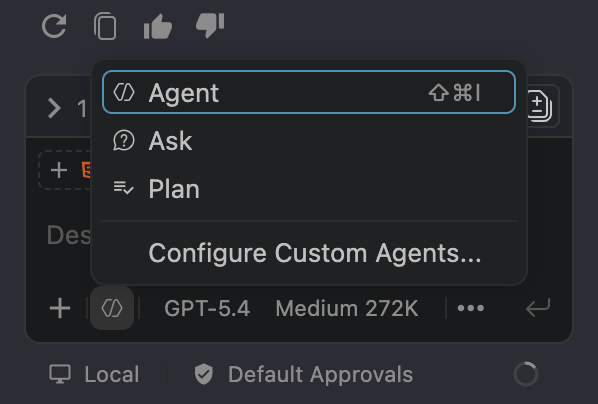
Use a planning pass when
- You need scope, order, trade-offs, or a written plan like plan.md.
- You are still deciding which files or parts should change.
- You want risks, test steps, or undo notes before any edits.
Use Agent mode when
- The current step is chosen and small enough to test on its own.
- You can point Copilot at the exact files and parts to change.
- You want Copilot to edit code and run a small test for that step.
Attach files with # or @
- Type # or @ followed by a filename such as #index.html or @authService.py.
- Use the dropdown to pick the right file from the workspace.
- Attach only the main file and one related file when the change is small.
Use the built-in attach tools
- Click the + Add Attachment button next to the chat box to find and attach files.
- Type #editor to make Copilot read the file open in your editor now.
- After attaching files, name the functions, parts, or commands, and keep the chat only about the current step.
Quick context shortcuts: use #index.html or @index.html to attach a specific file, use #editor for the current tab, and use the + button when you want to browse attachments visually.
Completions are free: inline code suggestions and next-edit suggestions come with your seat and do not cost usage. Use them for normal typing, and save chat and Agent mode for work that needs real thinking.
Prompt and context strategy
Use short, clear prompts with only the context you need. The goal is not the longest prompt. It is the shortest prompt that tells the model exactly what to do.
Context checklist: the goal of the task, the 3 to 5 files you need (attached with #file, @file, #editor, or the + button), the exact functions or parts if you know them, clear rules, one or two examples to copy, and how to test it.
Thinking effort: set thinking effort to Medium by default for normal work. Raise it to High or Extra High for hard planning, design, or important reviews. More effort makes more thinking tokens, which cost more, so change it only when needed.
Brainstorm prompt
Use this only to plan the idea. Do not ask for code yet.
I want to solve [problem].

Relevant files (if known):
- [path/to/file]
- [path/to/neighbor]

Relevant functions or components (if known):
- [symbolName]
- [ComponentName]

Before writing code:
1. Give me 2-3 viable approaches with trade-offs.
2. Recommend the simplest acceptable option for this repo.
3. Ask clarifying questions only if the answer would materially change the implementation.

Keep it concise. Do not implement anything yet.
Planner prompt for plan.md
Use this when the task is big enough to need a written plan.
Create plan.md for [goal].

Relevant files:
- [path/to/file]
- [path/to/related-file]

Relevant functions or components:
- [symbolName]
- [ComponentName]

Output sections:
- Objective
- Assumptions
- Scope and non-goals
- Ordered implementation tasks
- Validation for each task
- Risks and rollback notes

Constraints:
- Prefer existing patterns
- Optimize for token efficiency
- Break work into commit-sized slices
- Do not expand scope beyond the stated goal
Executor prompt for implementation
This follows our workflow and keeps the model on one small step.
Please implement according to plan.md as follows.

Current slice:
- [task]

Target files:
- [path/to/file]
- [path/to/related-file]

Target functions or components:
- [symbolName]
- [ComponentName]

Expected validation:
- [command or manual check]

Execution rules:
- Follow plan.md and progress.md (create if not exist).
- After each completed task:
  1. Update progress.md
  2. Run linting, formatting and building
  3. Commit the task using git CLI
  4. Evaluate progress.md and continue until the plan is completed

Constraints:
- Read only files relevant to the current task
- Prefer existing patterns
- Stop and report blockers instead of guessing
- Do not widen scope without updating plan.md
- Do NOT include PII, secrets, or real customer data
Reviewer prompt
Use this only for hard reviews. For simple work, review it yourself.
Review the completed work against plan.md and progress.md.

Focus on:
1. Correctness and regressions
2. Security and data handling risks
3. Edge cases and integration gaps
4. Validation commentary

Do not suggest style-only changes.
Rate issues by severity.
Consequences and enforcement
Act on the problem right away. The goal is to stop waste and mistakes as soon as they show up.
| Violation | Why it matters | Required consequence |
|---|---|---|
| Sensitive data shared with a model | Private data, secrets, passwords, or customer data must never leave our control. | Stop now, report it, and change any exposed passwords or keys. |
| Agent used for a tiny task | Wastes tokens where extra thinking is not needed. | Stop the session, finish by hand, and use that case to draw a clearer line for what to do by hand. |
| No plan.md for a complex task | The work goes off track, context grows, and cost keeps rising. | Stop building until a clear plan exists. |
| The model gets too much or unrelated context | Higher cost and lower accuracy. | Start again with less context and a new chat. |
| A top model used for normal work | You are paying top-model prices for basic work. | Switch to a cheaper model now, and require a reason before using a top model again. |
| No update to progress.md after a task | There is no saved state to hand off. | Do not start the next task until progress is recorded. |
| No validation or checkpoint commit | Errors spread and the history gets hard to recover. | Do not mark it done until tests run and a save-point commit exists. |
| No review on complex work | Serious bugs slip through the first check. | Do a review pass or a careful human review before accepting. |
| No self-check at the end | You are trusting the tool more than yourself. | The change is not complete. |
Completion gate
Finishing is a set of steps, not a feeling. Every hard task should leave proof that the steps were followed.
Required before closing
- progress.md shows the real state of the plan.
- You ran the test commands if the repo has them.
- The current step has a save-point commit.
- The work was reviewed at the right cost level.
- You tested and checked the result yourself.
Working rule
The agent can speed up writing, planning, and building, but it does not take over ownership. You are still responsible for scope, correctness, and cost.